 by
by Google Ads can help a small business reach people who are already searching for a product or service. It can also waste money quickly when the campaign has no clear goal, broad targeting, weak landing pages, or poor conversion tracking.
This guide explains a simple way to plan and launch a small Google Ads search campaign. It focuses on budget control, keyword intent, ad structure, landing-page quality, and measurement. It does not assume that paid ads are right for every business. The aim is to help you decide carefully and test with limits you can afford.
Decide what a successful click should lead to
Do not start with keywords. Start with the business action you want after the click.
Common goals include:
- a phone call;
- a quote request;
- a booking;
- a product purchase;
- a software trial;
- a store visit;
- a qualified lead form.
If the desired action is unclear, campaign optimization becomes unclear too.
Choose one primary conversion
A local roofing company might choose completed quote forms as the primary conversion. Phone calls can be a second conversion. A small ecommerce shop may use completed purchases as the primary conversion and add-to-cart actions as secondary diagnostic data.
Keep the main outcome simple enough to measure.
Check whether paid search fits the customer journey
Google Search ads work best when people already search for something related to your offer. A person searching “emergency plumber near me” shows clear commercial intent. A person searching “why does a tap drip” may still need help, but the intent is more informational.
Search volume alone does not make a keyword valuable. The phrase should connect to the service, location, price range, and customer need you can actually serve.
Set a test budget based on economics, not a random number

There is no universal “best Google Ads budget.” Costs vary by industry, location, competition, device, time, and keyword.
Use a simple calculation instead.
Step 1: estimate the value of a new customer
Suppose a cleaning company earns an average of $240 in gross profit from a new customer over the first few months. The owner decides they can spend up to $60 to acquire a new paying customer and still keep the channel worthwhile.
Step 2: estimate your lead-to-customer rate
If one out of four qualified leads becomes a paying customer, the business can spend about $15 per qualified lead to stay near its $60 customer acquisition target.
Step 3: estimate how many leads you need for a fair test
One or two leads are not enough to judge a campaign. If the business wants at least 20 qualified leads for an early test, a rough lead budget would be around $300 at a $15 target cost per lead. Real costs can be higher or lower, so build room for uncertainty.
This approach connects spend to business economics rather than an arbitrary daily number.
Set a daily limit you can tolerate
Once you choose a total test budget, convert it into a daily plan based on how long you want the test to run.
For example, a $600 test over 30 days averages about $20 per day. That does not mean results will appear evenly every day. It simply creates a spending boundary you can monitor.
Review the current budget behavior and billing guidance inside Google Ads because platform rules and settings can change.
Use conversion tracking before you spend seriously
If you cannot measure the desired action, you may optimize for clicks instead of business results.
Track actions that matter
Depending on the business, track:
- completed forms;
- qualified phone calls;
- purchases and revenue;
- booked appointments;
- trial signups.
Test each conversion yourself before launching. Submit the form, make a test booking, or complete a test purchase where practical. Confirm that the platform records the event correctly.
Build one focused campaign first
A small advertiser usually learns faster from one focused campaign than from ten small campaigns with almost no data.
Start with one high-priority service, product group, or location. Expand only when the first structure is understandable.
Example campaign structure
A local appliance repair company could begin with:
- Campaign: Appliance Repair – Main Service Area
- Ad group: Refrigerator Repair
- Ad group: Washer Repair
- Ad group: Dishwasher Repair
Each ad group should lead to a landing page that closely matches the service.
Research keywords by intent

Keyword research for ads is different from blog keyword research. You are paying for clicks, so commercial relevance matters heavily.
Start with service and problem phrases
A dentist offering emergency appointments may test phrases around emergency dentist, urgent tooth pain, broken tooth appointment, or same-day dental care where the service is genuinely available.
Use Google Keyword Planner for keyword ideas and estimates, but treat forecasts as planning inputs rather than promises.
Understand keyword match behavior
Google Ads offers keyword matching options that control how closely a search may need to relate to your keyword. The platform can change matching behavior over time, so review the current official guidance inside Google Ads before launch.
For a new small campaign, the main goal is control. Use match settings that give you enough reach to learn without allowing large amounts of unrelated traffic.
Build a negative keyword list
Negative keywords can prevent ads from appearing for searches that do not fit your offer.
Examples depend on the business. A premium commercial printer may exclude terms related to free templates, home printer repair, or jobs if those searches do not match the service.
Review the search terms report
Search behavior often reveals words you did not predict. Review actual search terms regularly and add negatives when a query is clearly irrelevant.
Do not block a term only because one click did not convert. Look for clear intent mismatch.
Use location targeting carefully
A local business should advertise only where it can realistically serve customers.
If a cleaning company covers five towns, do not target an entire country. If a software business sells nationally, broader targeting may be reasonable.
Check location settings, not only the map
Advertising platforms may offer different options for people in, regularly in, or interested in a location. Review the current setting and choose the one that matches your service model.
Choose an ad schedule based on operations
Do not automatically run ads 24 hours a day. Consider when customers search and when your business can respond.
A restaurant may want ads around meal-planning hours. An emergency service may need all-day coverage. A B2B consultant may start with working hours and expand after reviewing data.
Write ads that match the search
Good search ads are specific. They connect the searcher’s problem to a clear offer.
Useful ad elements
- the exact service or product category;
- relevant location when local;
- a credible differentiator;
- a practical next step;
- accurate availability or terms.
Avoid claims such as “#1 guaranteed” unless you can support them and the advertising policy allows them.
Create more than one useful message
Responsive search ads can combine different headlines and descriptions. Give the system varied, accurate assets rather than the same sentence repeated in different orders.
For a tutoring service, useful messages might include subject expertise, online or local availability, grade levels served, scheduling options, and the next step for parents.
Use ad assets where they add information
Assets can provide extra links, phone details, locations, prices, promotions, or structured information depending on eligibility and campaign type.
Add them when they help the user choose. Keep all details current. A sitelink to an expired service page creates a poor experience.
Send traffic to a focused landing page
The landing page should continue the promise made in the ad.
If the ad promotes “same-day dishwasher repair,” sending the user to a generic homepage with ten services creates extra work. A dishwasher repair page with service area, availability, process, trust information, and a clear booking action is stronger.
Landing-page checklist
- Headline matches the user’s need.
- Service or product is explained clearly.
- Price or pricing approach is transparent where possible.
- Trust information is visible.
- Phone or form works on mobile.
- Page loads quickly.
- Privacy information is available.
- The next step is obvious.
Do not make the form longer than necessary
Ask only for information you need to respond or qualify the lead.
A local repair company may need name, contact details, postcode, appliance type, and a short problem description. Asking for ten extra fields can create friction without improving the lead.
Check the mobile experience
Many commercial searches happen on phones. Open the landing page on a real mobile device and complete the conversion yourself.
Check that the phone button works, the form fields are easy to use, important text is visible, and consent notices do not cover the action.
Launch with a small set of high-intent keywords
A first campaign does not need hundreds of keywords. Start with a manageable group that closely matches the service.
This makes it easier to review search terms, ads, and conversion quality. Expand after you understand which themes attract the right customers.
Review lead quality, not only cost per conversion
A cheap lead is not valuable if the person is outside your service area or wants a product you do not sell.
Track what happens after the lead
For each lead, note:
- qualified or unqualified;
- reason if unqualified;
- appointment booked;
- sale completed;
- revenue or value if appropriate.
This feedback helps you improve targeting and landing-page messaging.
Use simple weekly checks
New advertisers often change too much too quickly. Use a consistent review routine.
Weekly campaign review
- Confirm spend is within your limit.
- Check conversion tracking.
- Review actual search terms.
- Add clear negative keywords.
- Compare leads by keyword theme.
- Check location and device patterns.
- Review landing-page problems.
- Note changes before making new ones.
A change log helps you remember what was adjusted and when.
Do not optimize only for click-through rate
A high click-through rate can show that an ad is relevant, but it does not prove that clicks become customers.
Use several levels of data:
| Level | Question |
|---|---|
| Search term | Is the person looking for what we offer? |
| Ad | Does the message match the need? |
| Landing page | Can the person understand and act? |
| Lead or sale | Did the visit create business value? |
Know when to pause a campaign
Paid ads are a test, not a commitment.
Pause or reduce spend when:
- tracking is broken;
- the landing page has a major error;
- most search terms are unrelated;
- the business cannot respond to leads;
- the cost exceeds what the economics can support;
- the offer is temporarily unavailable.
Fix the underlying problem before spending more.
A realistic small-business example
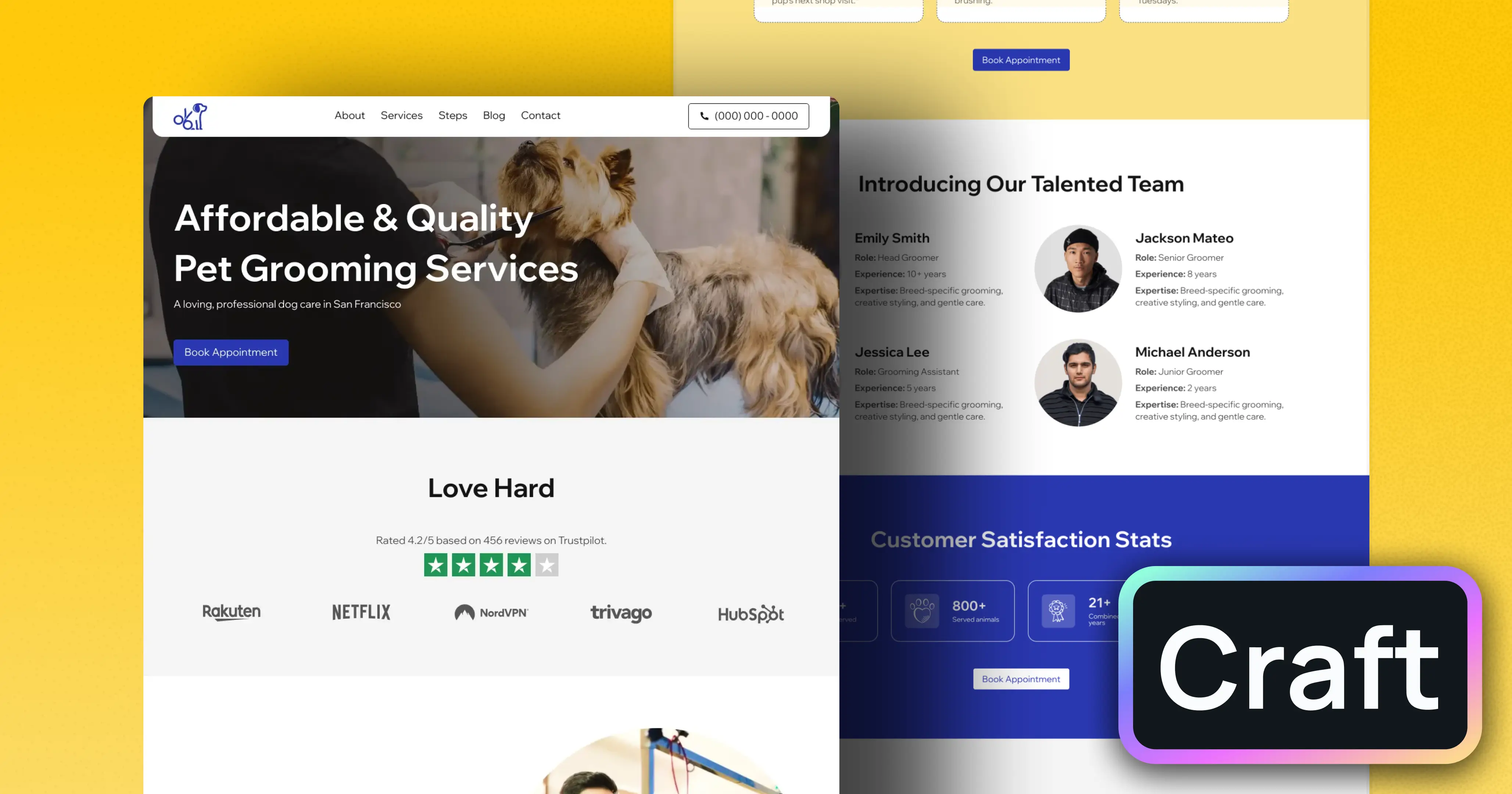
Imagine a local dog grooming studio wants more weekday bookings. The owner has a limited monthly test budget.
The studio chooses completed booking requests as the primary conversion. It targets only the towns it serves and creates ad groups for dog grooming, puppy grooming, and de-shedding services. Each ad group points to the closest matching service section.
The owner excludes job-related and training-course searches, checks search terms twice per week, and records which enquiries become real bookings. After a month, the studio finds that puppy grooming produces fewer leads but a higher booking rate. The owner shifts more budget toward that theme instead of chasing the cheapest click.
This is the type of learning a small controlled campaign should produce.
Common Google Ads mistakes for small businesses
Sending all traffic to the homepage
Use a page that matches the service or product searched for whenever possible.
Targeting too many keywords at launch
Start focused so you can understand what is happening.
Ignoring search terms
Actual search terms can reveal wasted spend and new opportunities.
Running without working conversion tracking
Clicks alone cannot tell you whether the campaign supports the business.
Changing settings every day
Give tests enough time to produce useful data unless there is a clear problem that needs immediate correction.
Using budget as the only solution
More spend cannot fix weak intent, a poor landing page, or an offer customers do not want.
Google Ads setup checklist
- Choose one primary business conversion.
- Confirm paid search fits the customer journey.
- Set a test budget using customer economics.
- Choose a daily limit you can tolerate.
- Install and test conversion tracking.
- Start with one focused campaign.
- Group keywords by close service intent.
- Build a negative keyword list.
- Set realistic location targeting.
- Choose an operating schedule.
- Write accurate, specific ad messages.
- Add useful ad assets.
- Use focused landing pages.
- Test forms and calls on mobile.
- Launch with a manageable keyword set.
- Review lead quality.
- Run a weekly campaign check.
- Pause when tracking, service, or economics fail.
Frequently asked questions
How much should a small business spend on Google Ads?
There is no universal amount. Work backward from the value of a customer, your acceptable acquisition cost, and the number of leads needed for a useful test. Industry click costs vary widely.
How long should I run a test campaign?
Long enough to collect meaningful conversions, not simply a fixed number of days. A low-volume local service may need more time than a high-volume ecommerce store. Set a total budget limit and judge the test by data quality.
Should I use broad match keywords?
The right match type depends on the campaign, conversion data, and level of control needed. Review current Google Ads documentation because match behavior changes. New advertisers should pay close attention to actual search terms regardless of match type.
Can Google Ads guarantee sales?
No. Ads can create visibility and visits, but sales depend on demand, targeting, offer quality, price, landing pages, follow-up, competition, and many other factors.
Conclusion
A small business Google Ads campaign should begin with limits and measurement. Define the conversion, set a budget based on business economics, target a narrow group of high-intent searches, and send people to a page that matches what the ad promised.
Then review real search terms and lead quality every week. If the campaign attracts the wrong people, fix targeting. If the right people click but do not act, review the landing page and offer. Paid search becomes easier to manage when every decision connects back to a measurable customer action rather than clicks alone.