
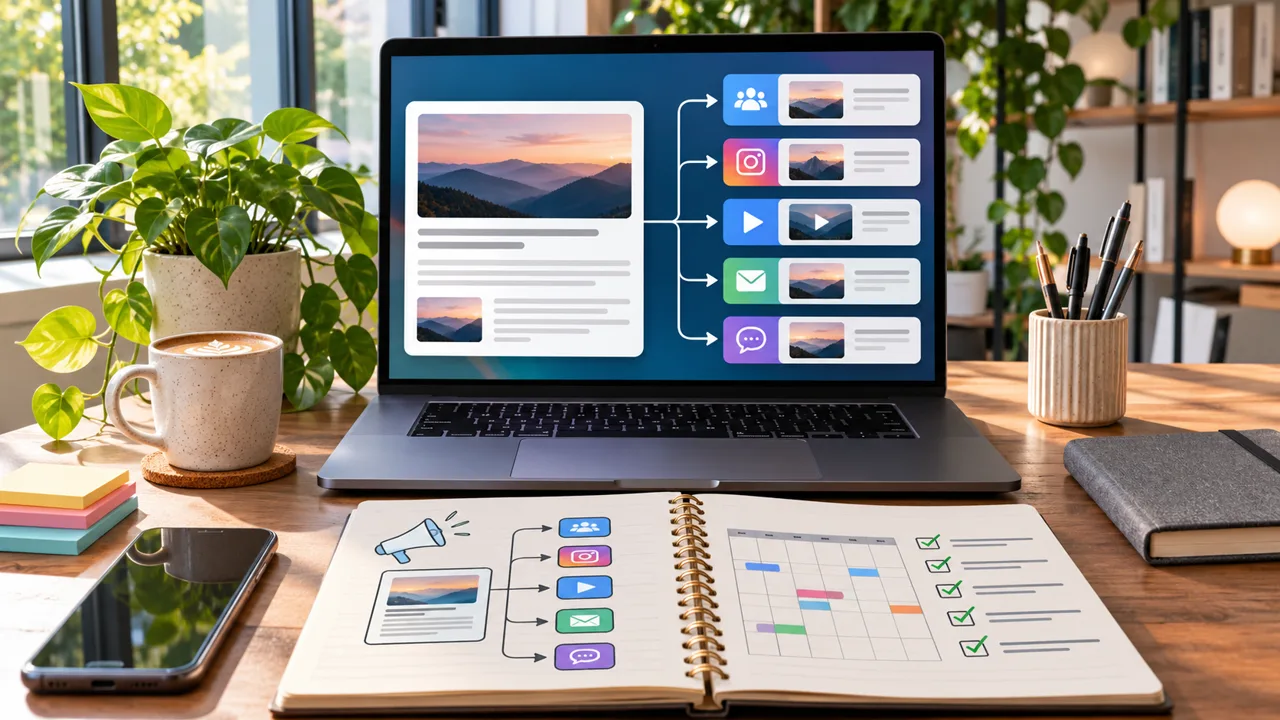
Content Distribution for Small Blogs: Get Useful Articles in Front of the Right Readers
Publishing an article is only one part of helping people find it. A useful guide can sit unseen if the audience does not know it exists. Content distribution means sharing the right resource through channels where people already ask related questions. It is not a reason to paste the same promotional message everywhere.
This guide explains how a small publisher can plan distribution with limited time, choose suitable channels, reuse ideas without copying entire posts, and measure whether the effort helped readers. It is written for a global audience, so the approach avoids assuming one platform or country works for everyone.
Start with the article’s reader
Before sharing, write down the problem the article solves and the person who needs it. A guide to filing an expense report may help remote workers and small teams. A guide to setting up a garden irrigation timer may belong in a hobby group. The channel should match the task, not simply have a large follower count.
Ask what people are doing just before they need the article. They may search for a fix, read a newsletter, watch a tutorial, or ask a question in a community. That moment can suggest how to introduce the resource in a helpful way.
Choose a small number of channels
Use your own site first
Add contextual internal links from related articles and place the new guide in a sensible category. Check that the page works on mobile and offers a clear title. A visitor who has already found one useful answer may be the best person to read the next guide.
If the article replaces old advice, update the earlier page with a clear route to the new resource. Do not leave conflicting instructions live. Distribution begins with the experience of people already on your website.
Use email when subscribers asked for the topic
A newsletter can introduce a guide to people who opted in for related information. Keep the message short: explain the problem, share one practical insight, and link the full article. Do not turn every edition into a list of every new post. A focused recommendation is easier to use.
If subscribers chose topics or frequency, honor those choices. A person who signed up for product updates may not want daily editorial links. Clear preferences and unsubscribe support protect trust and keep distribution useful.
Participate in relevant communities
A forum or professional group may allow helpful links when they answer a real question. Read the rules before posting. Give a useful answer in the conversation itself, then link the article only if it adds details. A drive-by link with no explanation can feel like spam.
If someone asks how to compare website hosts, explain two or three key criteria and the trade-offs. A deeper guide may help after that. Do not pretend to be an independent customer if you own the site. Be clear about your connection to the resource.
Adapt the message to the channel
A LinkedIn post may work as a short lesson for professionals. A vertical video may show one step from a tutorial. An email may highlight a reader problem and offer the full answer. These are different formats with different expectations. Copying the same caption everywhere often ignores the context.
The core claim should remain accurate across formats. A short post may leave out detail, but it should not exaggerate or change the conclusion to attract clicks. The article must deliver what the teaser promises.
Write a useful social post
Begin with a common problem and one concrete answer. For example: “A project quote can look cheap until revision rounds and handover tasks are added. Check these three items before comparing providers.” Then point readers to the detailed guide if they need the full checklist.
Avoid vague hooks such as “You won’t believe this secret.” A practical reader needs to know what they will learn. Clear wording may attract fewer casual clicks but more relevant visitors.
Turn one section into a short video
Choose one process that can be shown on screen. Demonstrate it in a few steps with accurate captions. Link the complete article through the platform’s supported profile or description features. Do not cram an entire long guide into a fast sequence that viewers cannot follow.
If the article includes a comparison table, a video can explain how to use it rather than reading every cell aloud. This gives the video its own value while leaving detailed reference material on the website.
Build a simple distribution plan
For each new article, choose one primary channel and one supporting channel. Decide what action you want, when to share, and what form the message will take. A resource that solves an evergreen problem can be shared again when the question becomes relevant, but repeated posting without new context is rarely useful.
- Confirm the article solves one clear problem.
- Add two or three relevant internal links where appropriate.
- Choose the channel where that audience already seeks help.
- Create a channel-specific explanation or example.
- Record useful visits, feedback, and follow-up questions.
A small plan prevents publishing from becoming a frantic daily task. Keep it sustainable. One good newsletter and a thoughtful community answer may be more valuable than ten weak posts.
Use partnerships carefully
A partner with a related audience may share a useful guide. Offer them a resource that genuinely helps their readers, not a demand for a backlink. If you collaborate on content, be clear about sponsorship or financial relationships. Do not pay for undisclosed endorsements.
For example, a nonprofit that teaches basic digital safety might share a clear password guide with a community center. Both organizations should check that the advice is current and appropriate for their audience. The goal is to make help accessible, not simply exchange links.
Measure the right result
Track engaged visits and tasks
Page views are a starting point. Ask whether visitors found the answer, reached a related resource, signed up with permission, or took another meaningful action. The right metric varies by article. A technical troubleshooting page may succeed when people leave with the fix and do not need further support.
Use analytics in a privacy-respecting way and label campaign links consistently when appropriate. A social referral count can be incomplete because apps, privacy settings, and cross-device visits affect attribution. Treat reports as useful estimates, not perfect proof.
Look at comments and questions
Readers may tell you where the article is unclear. A repeated question could mean the headline overpromises, the answer is buried, or an important example is missing. Improving the resource may produce more value than increasing promotion.
Keep a short feedback log. Record the question, article section, and possible fix. If the article changes, update distribution messages so they reflect the new advice.
A practical month-long example
A small marketing blog publishes a guide to email authentication. In week one, it links from a related newsletter article and sends a focused email to subscribers who want technical tips. In week two, it shares a short video showing how to find DNS settings. In week three, it answers a relevant question in a professional community where links are allowed.
In week four, the publisher reviews questions and corrects one confusing section. The plan uses distinct contributions instead of repeating the same link. It does not assume that all readers use one social network.
When to share an older article again
Evergreen material can become timely when a product changes or a question returns. Before resharing, check links, screenshots, facts, and dates. Explain what is still relevant or what has been updated. Do not change the publication date merely to make old content look new.
A yearly guide may need a full review. A basic explanation may remain useful for years. Let the subject and accuracy determine the schedule, not a fixed rule that every post must be refreshed after a certain number of months.
Avoid common mistakes
Posting the same link in unrelated groups
Large reach does not make an audience relevant. Unrelated posts waste people’s time and may violate community rules. Share only when you can explain why the resource helps the group.
Measuring only clicks
A dramatic headline can earn clicks while disappointing readers. Compare click quality, feedback, and the article’s actual usefulness. If people leave because the answer is missing, fix the content or promotion before buying more traffic.
Ignoring platform and copyright rules
Do not reuse someone else’s images or videos without permission. Check platform policies for links, promotions, and disclosures. Attribute useful sources properly and keep ownership clear.
Keep search and people-first quality aligned
Google Search Central’s people-first content guidance favors content designed to help people rather than content made mainly to manipulate search traffic. Distribution should follow the same idea. Make the answer useful first, then help the right audience find it.
When a reader follows a shared link, the page should match the promise, load well, and provide original value. Good distribution cannot rescue a thin article for long. It can, however, reveal where a strong article needs clearer examples.
Build a repeatable habit
For every new guide, identify the reader, choose suitable channels, create a helpful introduction for each, and review feedback. Keep a record of what worked without turning the process into a complicated dashboard. The goal is a steady flow of useful connections between questions and answers.
A small blog does not need to be everywhere. It needs to be present where its readers genuinely need help. Focus on relevant moments, clear messages, and honest measurement. That approach is sustainable and respects the audience.